
2.16.0 Release Kraken Careers
Smarter Screening for Faster Hiring
Kraken Careers 2.16.0 is here, bringing a more focused way to collect, score, and review applications directly inside WordPress.
This release introduces Screening Questions, applicant scoring, score-based automation, clearer review stages, new job columns, and a brand new dashboard that help hiring teams see what needs attention at a glance.
What’s Inside
Screening Questions
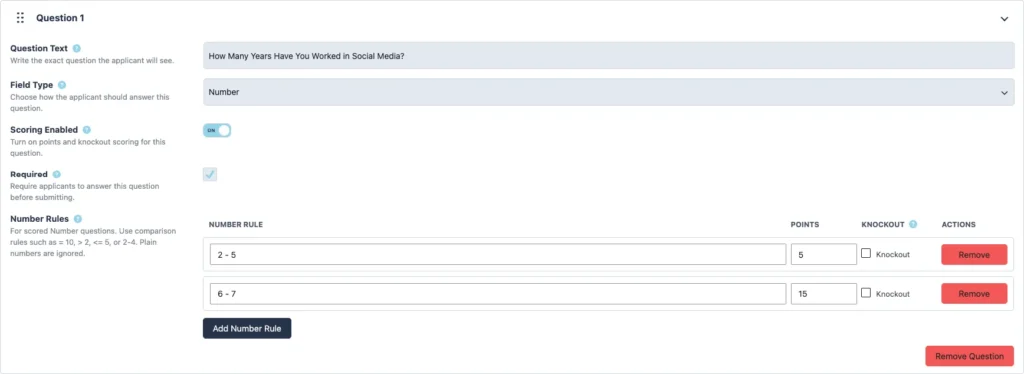
Build reusable question sets for your jobs with support for text, textarea, number, checkbox, radio, select, URL, and upload fields.
Questions can be required, reordered, and attached to job postings so each role collects the details your team actually needs.
Applicant Scoring
Checkbox, radio, select, and number questions can now be scored. Add points to preferred answers, create number-based scoring rules, and mark knockout answers when a response should immediately move an applicant out of consideration.
Reviewers can see the applicant’s screening score, matched rules, points earned, and any knockout answers from the application screen.
Score-Based Automation
Kraken Careers 2.16.0 can automatically move applicants into review stages based on their screening score.
Set approval and rejection thresholds, then choose where qualified or unqualified applicants should move, including Action Needed, Needs Review, Interview Scheduled, Hired, Rejected, and more.
Clearer Job Columns
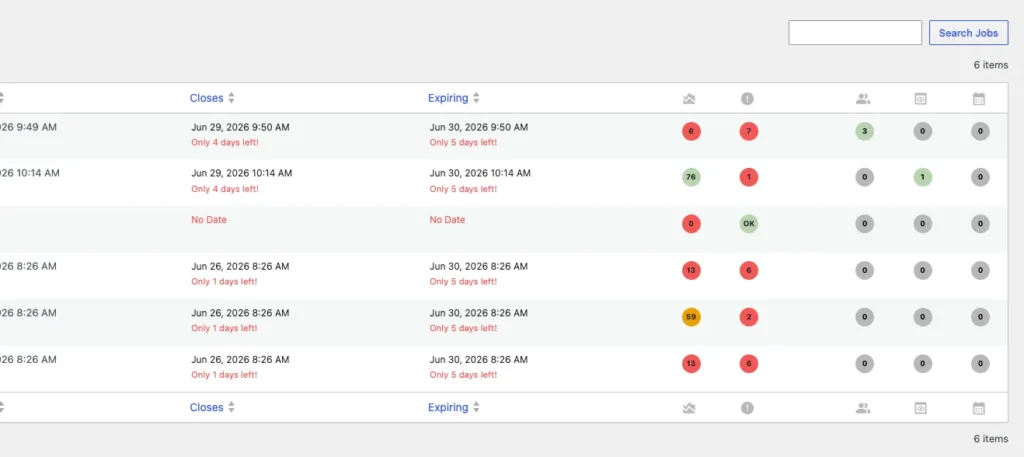
The Jobs list now includes quick-count columns for Action Needed, Needs Review, and Interviews Scheduled. Each count links directly to the filtered applications list, making it faster to move from a job posting to the applicants who need follow-up.
Cleaner Application Review
Applicant Review Stage options have been updated to better match the hiring process. “Location Applying For” now appears in the application summary, new applications are easier to spot with a New badge, and applicant tags have been removed to keep the review workflow cleaner.
New Dashboard
Kraken Careers now includes a dedicated Dashboard screen, giving hiring teams one place to see the work that needs attention.
The dashboard brings together active job postings, application queue counts, recent applications, expiring jobs, setup alerts, reviewer workload, and release notifications in a cleaner widget-based layout. Widgets can be collapsed, rearranged with drag and drop, and saved per user, so each team member can keep the dashboard organized around the way they work.
What You Can Do
- View published job postings in an expandable accordion layout.
- Jump from job counts directly into filtered application lists for Action Needed, Needs Review, and Interviews Scheduled.
- See jobs expiring soon and quickly edit them before they close.
- Review application queue totals at a glance.
- Track recent applications without digging through the full applications list.
- Spot setup and health alerts, including missing job dates and unassigned applications.
- Review workload by assigned reviewer.
- Keep up with release notifications from the dashboard.
Dashboard Access by Role
- Administrators and all Kraken Careers roles can access the Dashboard, while users outside the Careers roles cannot.
- Careers Admins and Careers Managers see the full dashboard, including all widgets and available actions.
- Careers Editors see release notes, published job postings, and jobs expiring soon. They can edit jobs, but application action buttons are limited.
- Careers Team users see release notes, application queue summary, recent applications, and published job postings. They do not see job edit controls.
Update to 2.16.0
Update to Kraken Careers 2.16.0 to start using Screening Questions, applicant scoring, and review-stage automation in your hiring workflow.