

Job Location
What is a Job Location?
Job Locations allow you to create and manage the various office or worksite locations associated with your company. These locations can be assigned to individual job postings, making it easy for applicants to see where each position is based.
One Job Location is required. If you’re a company hiring for your one-and-only location, one Job Location will be all you need, and it will most often be the same address used for your Company Profile.
Multiple Job Locations should be created for the various different locations where you are hiring for, where your employees will show up to work. These additional locations should have their own addresses, however if there isn’t a physical address (ie: working remotely in a location where there’s no company office) fill out as much information as possible.
For Job Location settings: go to Careers → Job Locations
Create a Job Location
When filling out the information, please ensure that it is for where the employee will show up to work (such as an office, worksite, remotely in a different community).
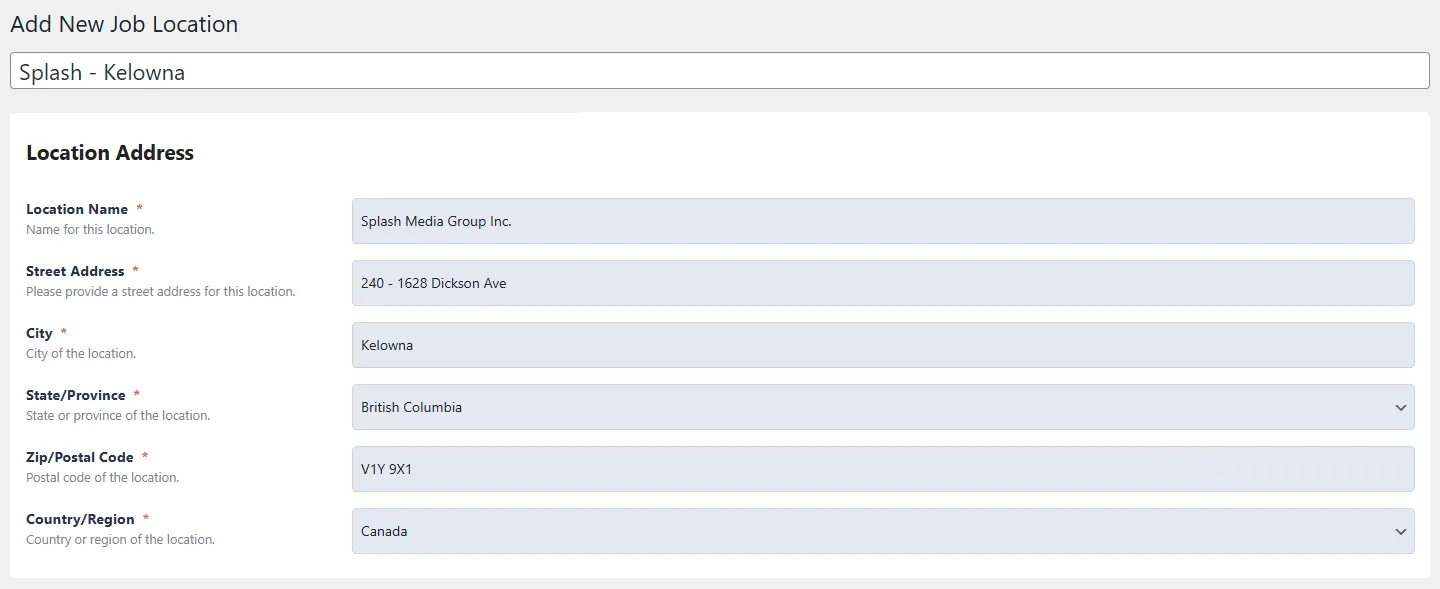
Add New Job Location
- Enter a unique name / label to identify this location profile (e.g., Splash – Head Office, Splash – Prince George, Splash – Kelowna).
Location Address
- Location Name: Name for this location (e.g., Splash Media Group Inc.).
- Street Address: Full street address for the location, including unit or suite numbers if applicable.
- City: City where this location is based.
- State / Province: State or province for the location.
- Zip / Postal Code: Full postal or ZIP code for the location.
- Country / Region Country or region in which this location operates.
Edit a Job Location
To edit an existing Job Location’s information:
- Click on the profile you want to edit, and make your desired edits.
- Make sure to save your edits.
Delete a Job Location
If you delete a Job Location, all job postings using that particular location will be affected. A new company profile must be manually assigned to each affected job posting.